The Complete Bus+ Guide: It’s Not Just for Buses! One App to Master the MRT, TRA, YouBike, and THSR — the Commuter’s Secret Weapon for All 5 Public Transit Systems
1. Introduction: Why Do You Need an App to Ride the Bus in Taiwan?
For foreign tourists who have just arrived in Taiwan, or for anyone just starting to dip their toes into public transit, the most maddening thing usually isn’t how complicated the routes are. It’s “Google Maps says the bus will arrive in 5 minutes, but I’ve been waiting 20 minutes and it’s still not here.” Google Maps may be the king of maps, but when it comes to “live bus tracking” in Taiwan, it’s often laggy. On top of that, Taiwanese buses have a quirk that’s very unusual to foreigners: you have to flag the bus down to make it stop. If you just stand there staring at your phone screen, there’s a good chance the driver will assume you’re a random pedestrian and drive right past you. Even more important is how accurately you can plan your trip. Bus+ can calculate the exact fare and travel time before you even leave the house, which is an indispensable advantage for budget-conscious backpackers and time-strapped commuters alike.
2. App Recommendation: Why Choose Bus+ Over Google Maps?
Since everyone already has Google Maps, why bother downloading Bus+? In short, Bus+ offers a kind of “hand-holding, all-in-one service” that takes care of every little detail for you.
- Google Maps’ pain point: Its strength is “finding places,” not “tracking buses.” Its arrival times are often estimated from the schedule rather than the bus’s real-time GPS location, which frequently leads to “ghost buses” or inaccurate timing.
- Bus+’s advantages:
- Spot-on timing: It plugs directly into the real-time public transit data of every city and county in Taiwan, with countdowns accurate to the second.
- All-in-one integration: Don’t want a phone crammed with a dozen apps? Bus+ brings buses, the MRT, the TRA, the THSR, and even YouBike stations all together in one place.
- Trip planning: This is the most powerful feature. It works out the most accurate arrival times and fares for you, the very details Google Maps so often overlooks.
- Clean UI: The super intuitive, clean UI means you can pick it up right away.
3. Bus+ App Hands-On Tutorial
3.1 Downloading the App and a Tour of the Interface
Bus+ is available on both iOS and Android. The first time you open it, I recommend granting GPS location permission, so the app can directly show you the “stops near you” and the “nearest YouBike stations,” which can save you a lot of extra walking.
Once you’ve downloaded and opened it, your interface should look something like the screen below. Let’s go through each of its amazing features one by one.
3.2 Look Up a Bus Route in Google Maps, Then Switch to Bus+ to Set Up Arrival Notifications and Save Stops
A lot of people’s habit is to first use Google Maps to figure out how to get somewhere, only to end up late because the bus times are off. Now, we’re going to teach you how to combine the strengths of both.
Step 1: Confirm Your Route in Google Maps
When you enter your destination (for example, from Taipei Main Station to Taipei 101) and select public transit, the map will show you several options.
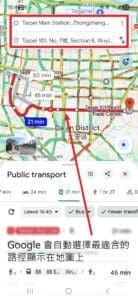
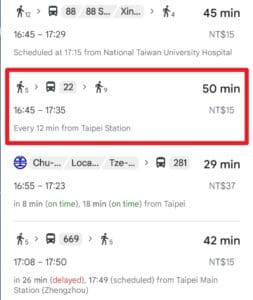
Scroll down, find the bus option that works best for you (in this example, the No. 22 bus), and tap it.
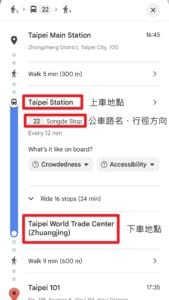
Next, Google will show you the detailed ride info. Make a note of three key things: where to board (Taipei Station), the bus number (22), and the direction of travel (To Songde Stop).
Step 2: Switch to Bus+ for a Quick Search
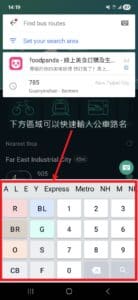
Now open Bus+ and tap the search box. You’ll see a keyboard icon in the top-right corner; tap it to enter your search manually.
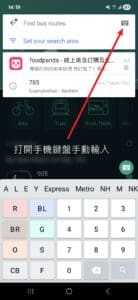
Bus+ has a built-in shortcut keyboard designed specifically for Taiwanese transit (for example, R for the Red Line, BL for the Blue Line, and so on), which lets you search bus numbers twice as fast as with a regular keyboard.
Type “22” into the search box, then tap the route from the precise search results below.
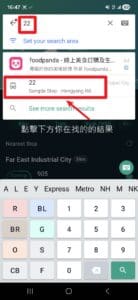
Step 3: Confirm Your Direction and Lock In the Stop
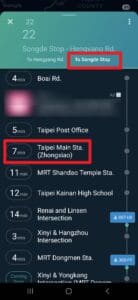
Once you’re on the route page, be sure to first confirm that the “direction” is correct (it should match the To Songde Stop you looked up earlier in Google Maps), then scroll down to find the stop where you’ll board.
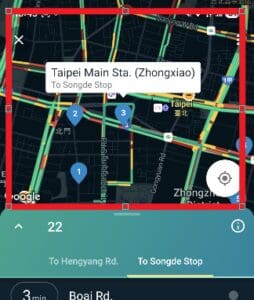
If you’re not sure exactly which side of the intersection the stop is on, tap the map area and the app will show both the stop’s coordinates and your real-time location (the blue dot). This is a great way to avoid standing on the wrong side at a big intersection.
Step 4: Set Up the “Arrival Notice” Service
This is Bus+’s most powerful feature. Tap the name of the stop you’ll be boarding at, and a menu of options will pop up. Choose “Arrival Notice.”
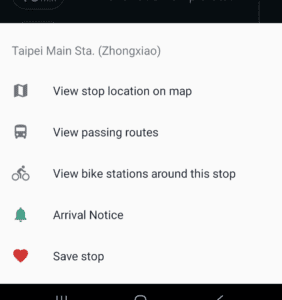
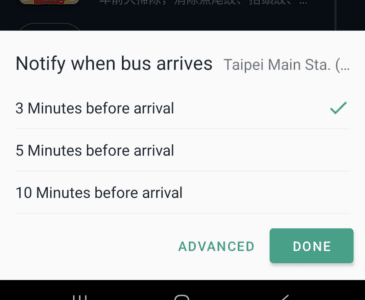
You can customize whether you want to be alerted 3, 5, or 10 minutes before the bus arrives. This is super handy if you’re waiting indoors or out shopping.
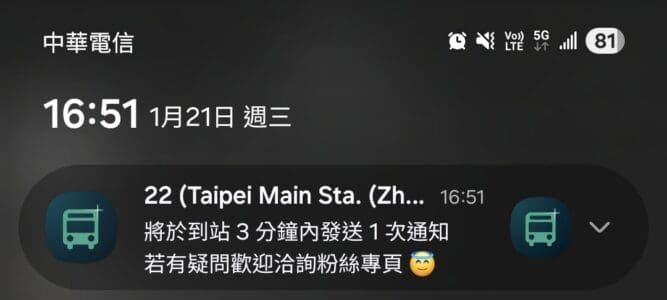
Once it’s set up successfully, the app will first pop up a confirmation notification letting you know the reminder is now active.
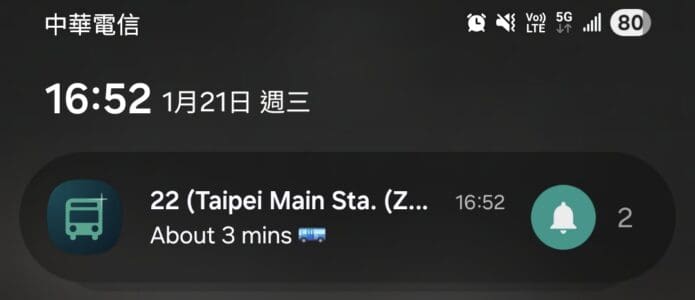
When the bus actually gets close (say, within 3 minutes), your phone will pop up a precise arrival alert again.
Step 5: Custom Groups
Finally, so you don’t have to search all over again in the future, use the “Save stop” feature to save the stop into a group. You can add tab labels as needed (such as Dawulun, Home, Hongdan Mountain, and so on). Tap the menu and choose “Save Stop.”
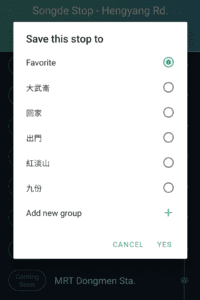
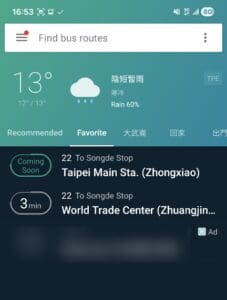
Once that’s set up, in the future you just open Bus+, swipe sideways on the home screen to the matching tab, and all the live bus info you need will be listed right there, achieving truly “one-stop,” brain-free lookups!
3.3 Finding Nearby YouBike Stations
Bus+ also integrates YouBike, Taiwan’s ubiquitous public bike-share system. Although Taiwan has more than 4,000 stations, which makes it look incredibly convenient, before you decide to rent one, as a local I have three sincere warnings for you.
Why I Don’t Recommend YouBike for Short-Term Tourists
- The roads are a death trap: Taiwan’s traffic is very dangerous for foreigners who aren’t used to driving on the right or to mixed traffic (scooters and buses sharing the lane). Traffic in the city moves fast, and there aren’t always dedicated bike lanes, so riding is extremely stressful.
- Registration hurdle: Signing up for a membership requires a Taiwanese mobile number. If you’re only visiting short-term and using roaming or a pocket WiFi device, your only option is “single rental.”
- The deposit trap: This is what people complain about most. When you use a credit card for a “single rental,” the system pre-authorizes a hold of [wpcs_price value=3000] as a deposit.
- Although this money isn’t actually charged, it ties up part of your credit limit.
- Banks usually take 72 hours or even longer to release the hold. This can be a big headache for backpackers on a tight budget.
If You Still Decide to Ride (How to Find a Bike)
If you’re in a safe area like a riverside park, and you’re okay with the conditions above, you can use Bus+ to quickly find a bike.
How to do it: Tap the “Bike” icon on the home screen.
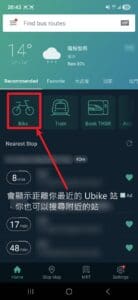
Key tip: Don’t use the text search! Bus+’s YouBike search isn’t very friendly toward English addresses. The fastest method is to look directly at the Map. With GPS turned on, the yellow icons on the map represent YouBike 2.0 stations, and the number indicates the bikes available.

A word of honest advice: Unless you’re an experienced cyclist riding on a riverside bike path, in downtown Taipei the MRT + walking will always be the safest and most comfortable choice.
3.4 Looking Up Train Schedules
Besides buses and the MRT, Bus+ is also a fantastic tool for looking up Taiwan Railways (TRA) timetables. When you’re planning a trip to slightly farther-flung spots like Jiufen (Ruifang Station), Keelung, or Hualien, the train is absolutely your best bet.
Step 1: Enter Train Lookup Mode
Back on the Bus+ home screen, tap the train icon.
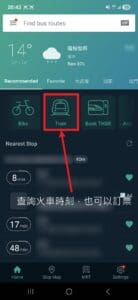
Step 2: Set Your Origin, Destination, and Time
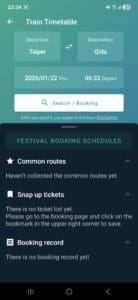
Enter your Departure and Destination stations, then pick the date and time you plan to leave. Once you tap search, the app will list every train.
Step 3: Understanding the Train Types
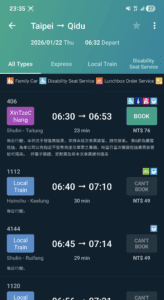
This step is the most confusing for foreigners, so look carefully at your search results:
- Local Train: Similar to the MRT, it stops at every station and has no assigned seating, and you Can’t Book it. Just tap your EasyCard and hop on.
- Express / Tze-Chiang (Tze-Chiang Limited Express / Puyuma): Fast, stops only at major stations, with assigned seating throughout (Reserved Seat). I recommend buying tickets in advance.
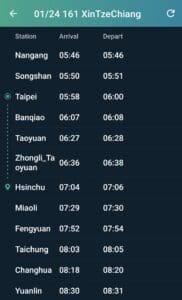
If you want to know which stations a particular train stops at along the way, just tap that train and you’ll see a detailed station-by-station timetable, making it easy to estimate when you’ll get off.
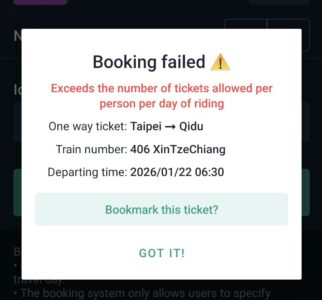
Although you’ll see a “Booking” button in the interface, I strongly recommend you don’t use it. Bus+’s booking system only accepts a Taiwanese national ID number, and for some reason I personally can’t even use it right now either.
💡 The right way to buy tickets (How to buy tickets):
- Local Train: Just tap your EasyCard at the gate to enter, as easy as riding the MRT.
- Reserved Seat (Express): Buy your ticket using the kiosk at a convenience store, download the official TRA App (TRA e-Booking), or buy from the TRA’s official website.
3.5 Looking Up High Speed Rail Schedules
If you’re heading from Taipei to Taichung, Tainan, or Kaohsiung, the Taiwan High Speed Rail (THSR) is the fastest option. Bus+ has thoughtfully integrated the booking entry point too.
Step 1: Enter the THSR Section
On the home screen, tap the “Book THSR” icon.
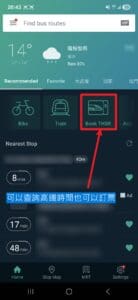
Step 2: Redirected to the Booking Page
After you tap it, you’ll find it sends you over to the well-known travel platform Klook. If you found this guide helpful and you’re also planning to book through Klook (foreign tourists buying THSR tickets on Klook usually get a buy-one-get-one-free deal or 20% off), please buy through my link below rather than the redirect in the app.
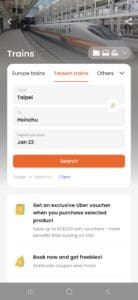
Step 3: Choose Your Train and Discount
After searching, it’ll list the next available trains, and you’ll see the discounted prices shown in red. These are usually a much better deal than lining up at the counter to buy a full-price ticket.
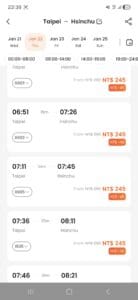
Step 4: Choose Your Class (Standard vs. Business)
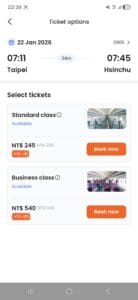
Finally, choose the class you want.
- Standard Class: Regular seating, clean and comfortable.
- Business Class: Roomier seats with complimentary coffee and snacks, perfect for travelers who want to really relax.
3.6 Looking Up MRT Schedules
In Taiwan, ahem, I mean in Taipei, the MRT is the most convenient way to get around. Not only has Bus+ integrated every MRT and light rail system in Taiwan, but there are also a few handy features here you might not have noticed.
Step 1: Switch Cities and Systems
Open the MRT page; it defaults to the Taipei Metro. If your itinerary includes a trip to the airport or to Taichung, tap the menu at the top to switch.
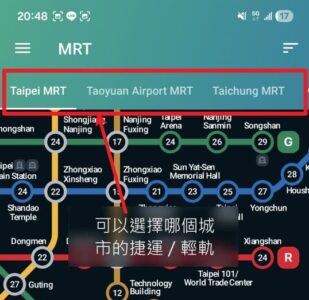
Step 2: Intuitive Map-Based Planning
Just tap the station you want to go to right on the map.
- Set your starting point: Once you tap a station, it’s set as your starting point (a green marker appears).
- Check the time: The app shows the “exact time” needed to get from your starting point to each station right on the map (in my own testing, on the Taipei Metro this number is accurate down to almost the exact minute).
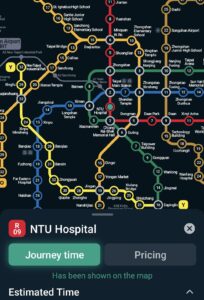
Step 3: Checking Fares (Pricing)
Switch to the “Pricing” tab and the numbers on the map instantly turn into “fares.” This is super helpful for staying on budget, since you can see at a glance how much the trip will cost.
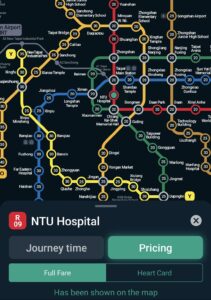
Step 4: Master the Timing
Once you’ve picked a route, swipe the bottom panel up. First, you’ll see “Estimated Time,” a real-time countdown of how many minutes until the next train arrives.
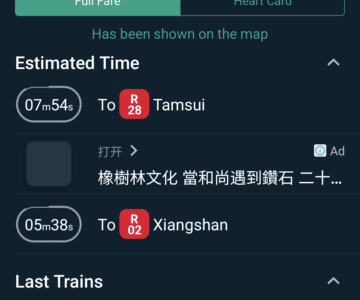
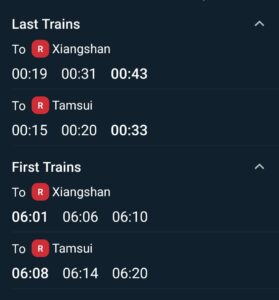
⚠️ A lifesaver feature: First & Last Trains Keep scrolling down and you’ll see “Last Trains.” If you’re out shopping or drinking in the Xinyi District at night, be sure to check this time first. Miss the last train and that taxi fare is going to hurt!
Step 5: Inside-the-Station Guide (Elevators, Restrooms, and Exits)
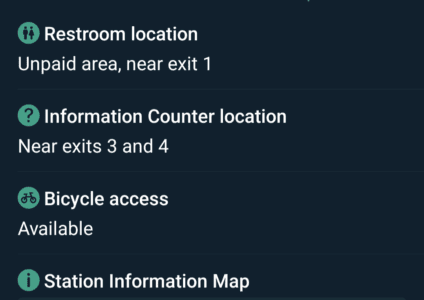
For travelers lugging large luggage, this feature is incredibly useful. Tap “Station Information”:
- Facilities list: This tells you in text whether the restroom is inside or outside the fare gates, where the information desk is, and whether bicycles are allowed.
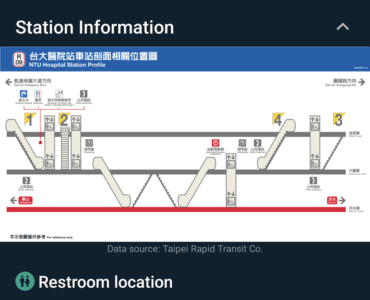
- Station cross-section diagram: If you’re a visual person, there’s a complete cross-section diagram here showing the relative positions of the elevators, escalators, and exits, so you don’t have to wander around the station maze in circles.
Step 6: The Last Mile (YouBike Connection)
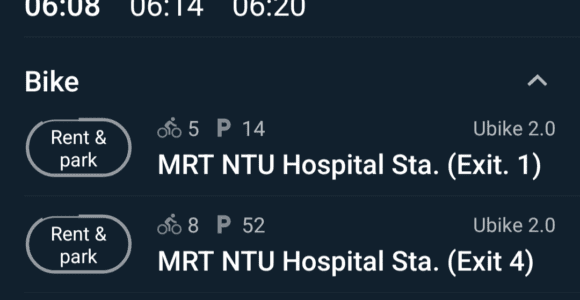
Still have a stretch to walk after leaving the MRT station? Bus+ thoughtfully integrates YouBike station info near that station’s exits. You can see right away which exit has bikes available to rent, seamlessly connecting the rest of your trip.
3.7 Super Handy Widgets
If you take the same bus every day, or you’re a commuter who has to catch a train each morning, setting up Widgets (home-screen widgets) is a skill you absolutely have to learn. It lets you see how many minutes until your bus arrives right on your phone’s home screen, without even opening the app.
Bus+ offers two different widgets: live bus tracking and TRA common routes. Here’s how to set up each one separately:
🅰️ Buses: The Live Tracking Widget
Prep work: “Save” your stops first This is where beginners most often get stuck! The widget can only display stops you’ve already “Saved.” So before you set this up, make sure you’ve already added your frequently used bus routes to your “Favorites” or a custom group within the app.
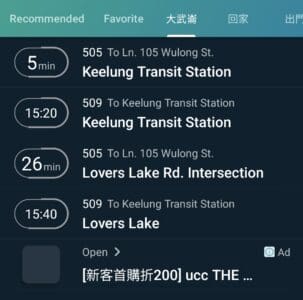
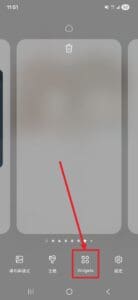
Step 1: Open the Widget menu Go back to your phone’s home screen, press and hold on an empty spot until the edit menu pops up, then tap “Widgets.”
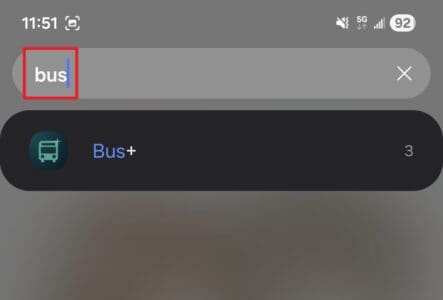
Step 2: Search for Bus+ Type “Bus+” in the search bar to quickly find its list of widgets.
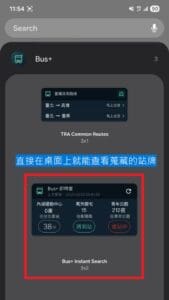
Step 3: Choose a style Here you’ll see several options. Swipe left and right to find the “Bus+ Instant Search” style, and drag it onto your home screen.
Step 4: Set the stops to display When you first place it on the home screen, it’ll show a gray “Add bus stop.” Tap it to configure.
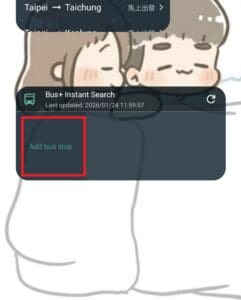
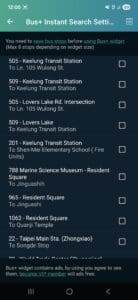
Next, the system will list all your “Saved stops.” Check off the routes you want to display in this block (for example, the intercity coach from Keelung to Taipei, or your bus home).
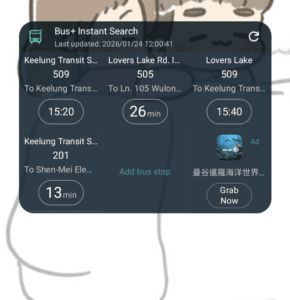
Done! Once it’s set up, the bus’s live arrival time will show right on your home screen, and it’ll even display “last bus has departed,” so everything’s clear at a glance!
🅱️ TRA: The Train Schedule Widget (Train Widget)
Besides buses, Bus+ also has a “TRA Common Routes” widget made specifically for train riders. Its setup logic is a little different.
Prep work: Save a train route You first need to go into the app’s “Train” lookup page, search for your origin and destination stations (for example, Taipei ↔️ Sankeng), then tap the “star/bookmark icon” in the top-right corner to save it.
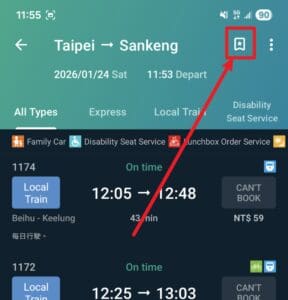
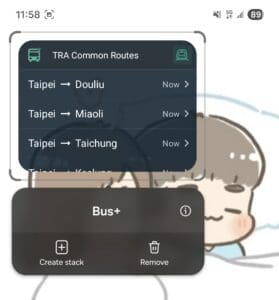
Setup steps Go into your phone’s Widgets menu the same way, but this time choose the “TRA Common Routes” style.
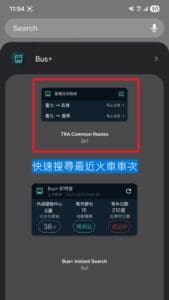
How to use it Once you’ve dragged it onto your home screen, you can see at a glance what time the next train is and what type it is. Tap “Depart now” and it’ll even pull in the current time to run a search for you, which is super handy when you’re rushing to catch a train!
4. The Unwritten Rules and Etiquette of Taiwanese Buses
When you ride the bus in Taiwan, there are a few unwritten rules that aren’t posted at the stop and that you might not know about:
4.1 Flag the Bus Down When You See It
This one is really important! In Taiwan, buses don’t stop at every stop. When you see the bus you want coming from a distance, be sure to raise your hand to signal it. If you’ve got your head down scrolling your phone or you don’t make any move, the driver won’t think you want to get on and will drive right past.
4.2 Tap Your Card Both Getting On and Off
Although some special buses may have different rules, the simplest principle is to “tap once when you board and once when you get off.” If you forget to tap when getting off, you’ll usually be charged for an extra fare zone.
4.3 Press the Bell When You Hear the Announcement
This is just as important as “flagging the bus down.” Taiwanese buses don’t stop at every stop.
- When do you press the bell? There’s an announcement on the bus calling out the next stop’s name (usually in Chinese, English, Japanese, and Korean). When you hear “Next stop is [Your Stop],” press the red button by the window or on the handrail right away.
- Confirmation signal: After you press it, you’ll hear a “ding-dong,” and the red “stop requested” light will come on.
- The consequence: If you don’t press the bell, and no one happens to be flagging the bus down at that stop, the driver will drive straight past without stopping.
4.3 Yielding-Seat Culture and Priority Seats
The dark blue seats are usually “Priority Seats,” reserved for the elderly, pregnant women, or those with mobility difficulties. Although regular passengers may sit in them too, when someone who needs one boards, you’re expected to give up your seat. But because some of the more extreme elderly folks or other people will deliberately give you a hard time just for sitting in this seat, you’ll often see an MRT car packed with people where no one dares to sit in these seats. If you’re visiting Taiwan, my advice is that unless the car is genuinely very empty, you should try to avoid these dark blue seats. Even if you do sit down, stay alert and be ready to stand up the moment you see someone approaching. To avoid misunderstandings or unnecessary conflict caused by a language barrier, standing might be the more stress-free choice.
4.4 The Driver’s “F1 Racer Soul”
I had to add this one! Taiwanese bus drivers’ braking and acceleration tends to be on the “bold” side.
Taiwanese bus drivers have very “skilled and bold” driving technique. The force when the bus starts moving and brakes is usually quite strong, so moving around while the bus is in motion is very dangerous. The moment you board and finish tapping your card, immediately find a seat or grip a handrail tight, that’s a good move. Before getting off, people tend to get up early to be ready to tap their card and exit.
5. Frequently Asked Questions
[faq_group]
[qa q=”Can I eat or drink on the bus?” a=”Although eating and drinking are prohibited on both buses and the MRT, please avoid eating or drinking bubble tea on board to prevent spills. Both trains and the THSR currently allow it.”]
[qa q=”What if my EasyCard runs out of money?” a=”You can’t top up on the bus. Please top up at a convenience store (7-11, FamilyMart) or a service desk at an MRT station before boarding.”]
[qa q=”What if I don’t have any change on me?” a=”Taiwanese buses don’t give change. If you put in a ≈ €2.78(NT$100) bill for a ≈ €0.42(NT$15) fare, the driver can’t give you change. I strongly recommend using an EasyCard or iPASS, or bringing exact change yourself.”]
[/faq_group]